Phone Control for Webex
Phone Control for Webex
Remotely control Cisco PhoneOS phones (9800 Series, 8875) on Webex Calling. View live phone display, press keys, capture screenshots, and retrieve phone details — all from your desk. Supports multiple Webex Calling organizations. Free in version 1.
Remotely control Cisco PhoneOS phones (9800 Series, 8875) on Webex Calling. View live phone display, press keys, capture screenshots, and retrieve phone details — all from your desk. Supports multiple Webex Calling organizations. Free in version 1.
Enhance your Webex Calling support with the UPLINX Phone Control for Webex to:
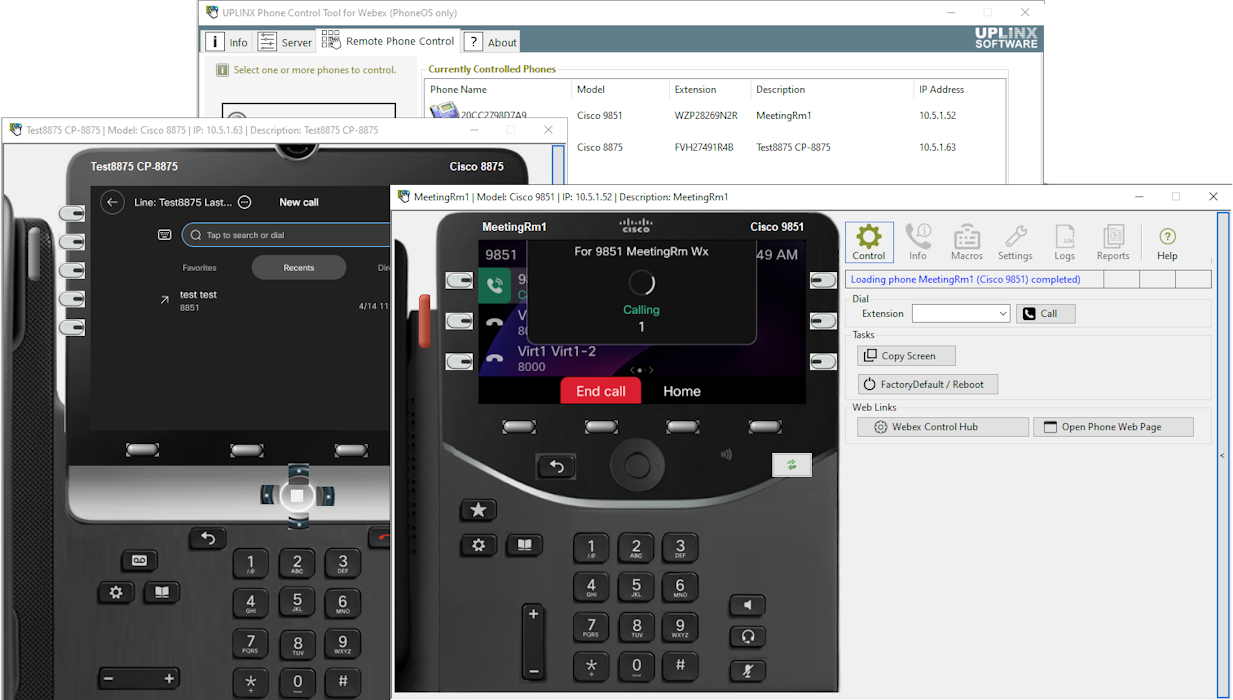
- Remotely control Cisco PhoneOS phones (9800 Series and 8875) directly from your desk
- View the live phone screen without visiting the device
- Retrieve detailed phone information including firmware, IP address, and registration status
- Generate a phone report with screen captures for documentation and support records
- Troubleshoot user-reported issues without leaving your desk
Try UPLINX Phone Control for Webex — Version 1 is completely FREE!
To use this app, you need a Webex Calling account with administrative rights and PhoneOS phones (9800 Series or 8875) and UPLINX Phone Control for Webex installed on a Windows machine. Download it from https://www.uplinx.com/downloads/, no registration is required.
We welcome your feedback to help shape future versions of this product. More at https://www.uplinx.com/phone-control-webex/
Support


Categories
Enhance your Webex Calling support with the UPLINX Phone Control for Webex to:
- Remotely control Cisco PhoneOS phones (9800 Series and 8875) directly from your desk
- View the live phone screen without visiting the device
- Retrieve detailed phone information including firmware, IP address, and registration status
- Generate a phone report with screen captures for documentation and support records
- Troubleshoot user-reported issues without leaving your desk
Try UPLINX Phone Control for Webex — Version 1 is completely FREE!
To use this app, you need a Webex Calling account with administrative rights and PhoneOS phones (9800 Series or 8875) and UPLINX Phone Control for Webex installed on a Windows machine. Download it from https://www.uplinx.com/downloads/, no registration is required.
We welcome your feedback to help shape future versions of this product. More at https://www.uplinx.com/phone-control-webex/